

Please note: this article contains affiliate links. If you buy through these, we may receive a commission at no extra cost to you. Using our links supports our work.
If you want to try Squarespace before committing to a paid plan, the good news is that the platform gives you a generous free trial (one that provides access to almost all its key features).
You can use the trial to build a website, test ecommerce features, experiment with templates and see whether Squarespace is the right fit for your business.
You can access the trial here, or read on to learn more about it.
How do I start a Squarespace free trial?
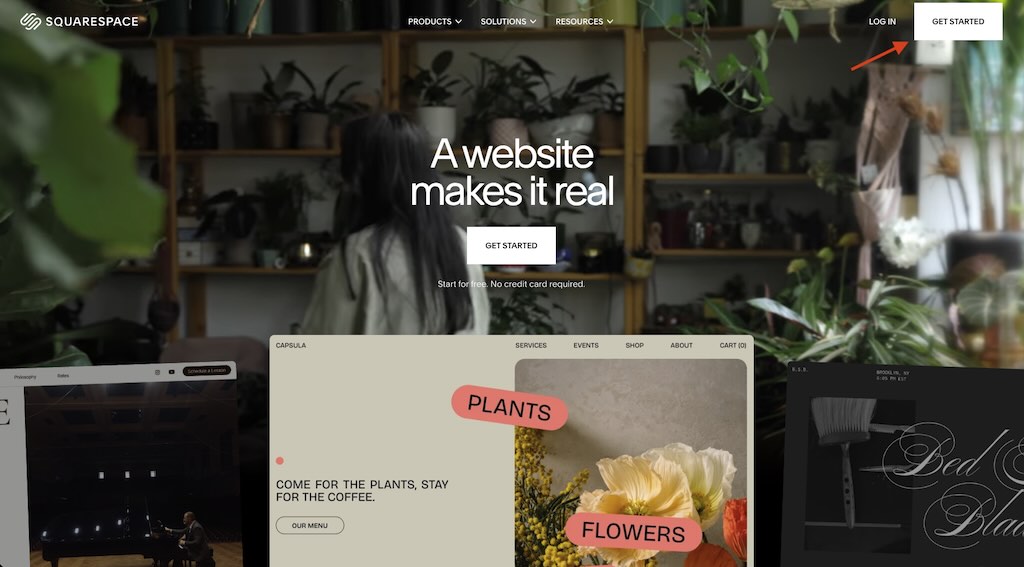
You can start a Squarespace free trial by going to the Squarespace website and clicking the “Get started” button. Alternatively, you can select a template and then click the ‘Start with this design’ button.
How long is the Squarespace free trial?
The standard Squarespace free trial lasts for 14 days. If you need more time to try the platform out, Squarespace also lets you request a 7-day extension.
Do you need a credit card to access the Squarespace free trial?
No. You can start a Squarespace trial without entering any credit card details.
What can you do during a Squarespace trial?
The trial gives you access to most Squarespace features, including web design tools, a blog, ecommerce tools, templates, integrations and SEO features. However, there are a few key limitations to be aware of. During the trial, you can’t put your site live, accept payments, or get your site indexed by Google.
Can you change templates while using a Squarespace free trial?
You can try any template you like while on a Squarespace trial. However, the latest version of Squarespace — version 7.1 — doesn’t technically support full template switching in the way older versions did. So if you want to try out an entirely different template while on a trial, you may need to start a new one.

Can you build an online store on a Squarespace trial?
You can build a store — but you can’t put it live. Payments can only be accepted on a Squarespace site if you are on a paid subscription.
How much does Squarespace cost?
Squarespace plans cost between $19 and $139 per month. You can usually save money by paying annually instead of monthly.
Is Squarespace good for ecommerce?
Squarespace’s ecommerce features are robust and work well for small businesses or creators — especially those that prioritize aesthetics (Squarespace’s templates are renowned for their quality). However, if your main goal is scaling a large ecommerce business, platforms like Shopify or BigCommerce generally provide more appropriate selling tools. Shopify in particular is a much better choice for international ecommerce.
Are there any discounts available for Squarespace?
Yes — Squarespace periodically runs promotions that lower the cost of monthly or annual plans. For example, you can get a 10% discount off a Squarespace subscription by starting a trial via this link and entering STYLEFACTORY10 when purchasing a plan. Additionally, paying upfront for a year brings further savings (of up to 36%).
If you intend to build multiple sites for clients, you can gain additional discounts by becoming a “Squarespace Circle” member.
Can people see my Squarespace site while I’m on a free trial?
Yes — but only if they enter a password. This password protection can only be removed if you upgrade to a Squarespace paid plan.
What happens to my site if my Squarespace trial expires?
When your Squarespace trial expires, your site won’t immediately disappear. Squarespace usually keeps your content saved for a period of time after your trial ends, allowing you to return later and upgrade to a paid plan. Nonetheless, if you want to be 100% sure of keeping your content safe, it’s best to upgrade to a paid plan before the end of your trial.
What are the main limitations of a Squarespace trial?
During a Squarespace free trial, you can access most of the platform’s core features — but there are some important limitations to be aware of. Trial sites can only have up to five contributors, and search engines won’t index your site during the trial. Some media and content features are restricted too: Getty Images can’t be licensed, audio blocks only work properly on the built-in Squarespace domain, and form submission emails are disabled unless you connect a third-party storage service like Google Drive or Mailchimp.
There are also several ecommerce limitations during the trial period. Although you can build an online store and configure products, you can’t accept payments, send customer notification emails, connect PayPal, create subscription products, or use advanced selling features like abandoned cart recovery until you upgrade to a paid plan.
What are the key alternatives to Squarespace?
Shopify and Wix are the key competitors to Squarespace. Shopify is the strongest alternative if you intend to sell online, as its ecommerce features are considerably stronger than Squarespace’s (especially if you intend to sell in multiple currencies or markets). Wix offers quite a few more features than Squarespace — again, especially where ecommerce is concerned — and provides a much larger range of templates. However, Squarespace beats Wix in the ease-of-use stakes and its templates are arguably more elegant than the Wix equivalents.

Am I charged automatically by Squarespace at the end of my trial?
No. Because Squarespace doesn’t require you to enter payment details before starting a trial, it can’t apply charges automatically at the end of your trial.
Squarespace free trial link
You can start a trial by clicking here — use the code STYLEFACTORY10 for 10% off your first year.
📖 Related resource: Best Squarespace templates

Chris Singleton is the Founder and Director of Ecommercetrix.
Since graduating from Trinity College Dublin in 1999, Chris has advised many businesses on how to grow their operations via a strong online presence, and now he shares his experience and expertise through his articles on the Ecommercetrix website.
Chris started his career as a data analyst for Irish marketing company Precision Marketing Information; since then he has worked on digital projects for a wide range of well-known organizations including Cancer Research UK, Hackney Council, Data Ireland, and Prescription PR. He then went on to found the popular business apps review site Style Factory, followed by Ecommercetrix.
He is also the author of a book on SEO for beginners, Super Simple SEO.