

Privacy laws have changed dramatically over the past few years. Regulations have been introduced across a wide range of territories that require ecommerce website owners to give visitors clear control over how their personal data is collected — examples include the EU’s GDPR, California’s CCPA, Brazil’s LGPD, and Canada’s PIPEDA.
In practical terms, this usually means blocking non-essential cookies until consent is given — and providing transparent information about the data you collect. Few ecommerce platforms provide adequate built-in tools for doing this, so merchants often have to turn to consent management platforms (CMPs).
These CMPs automate the process, detecting what cookies are running on your site, blocking the ones that require consent, and presenting visitors with a compliant, customizable banner.
So in this review, I’m taking a close look at one of the most widely-used CMPs: Cookiebot CMP by Usercentrics. First up, my quick review — followed by a deeper dive into its key advantages and disadvantages.
Our quick verdict on Cookiebot CMP
Cookiebot CMP is a dependable, well-established consent tool that performs all the key consent tasks well. It’s very easy to install, automates cookie detection and blocking effectively, works seamlessly with Google’s ecosystem, and provides strong geo-specific consent handling. The free plan is genuinely useful too.
That said, it’s not perfect. Because Cookiebot runs not on your site but via an external server, it can slow down your site a bit; the monthly scan frequency won’t always suit stores with a regularly changing technical setup; and its reporting and support options are fairly limited.
Overall score: 4.3 / 5
Advantages of Cookiebot CMP
1. Easy installation and wide compatibility
Cookiebot integrates well with Shopify, Wix, Squarespace, WordPress and most other ecommerce solutions. In many cases, installation is as simple as adding a small script to your site header or installing the official plugin. I’ve added it to various sites I manage, and had no major issues with the install process.

If your site uses lots of custom code or advanced tag manager setups, you may need developer support — but for most users, setup is smooth, and once installed, Cookiebot runs quietly in the background without disrupting your site’s appearance. It also provides helpful tools for managing multiple domains.
2. Automated detection and blocking of cookies
One of the best things about Cookiebot is its entirely automated approach to cookie scanning. Each month, the platform crawls your website, identifies all cookies and trackers, categorizes them, and blocks non-essential ones until your store visitors give consent to run them.
When you add a plugin or marketing tool that introduces new trackers, Cookiebot’s next scan picks it up and updates your consent setup and cookie banner automatically. This removes much of the manual work that other CMPs sometimes require and turns compliance into more of a “set-and-forget” process.
3. Geo-specific banners and automatic language detection
Cookiebot can adjust your consent banner automatically based on a visitor’s location. For example, based on their IP addresses,
- visitors in the EU see a strict opt-in banner, with all non-essential cookies blocked by default
- visitors in regions with opt-out models see banners that are more aligned with their local laws.
Cookiebot can also apply the appropriate language to banners based on IP address.
It has to be said that some initial configuration is needed to get all the geo-targeting side of things working properly, but once things are set up correctly, your store visitors can experience a legally appropriate consent setup no matter where they’re browsing from.
4. Excellent integration with Google products
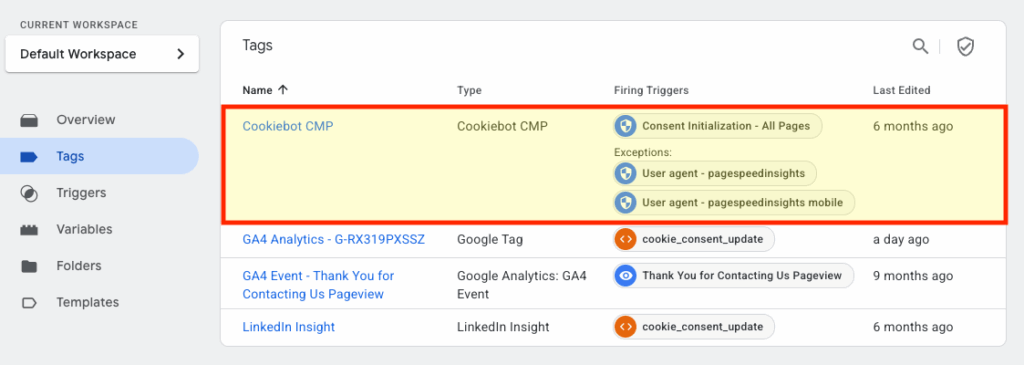
Since 2024, Google has required anyone serving personalized ads in the EEA and UK to use a Google-certified CMP. Cookiebot is officially certified and integrates deeply with:
- Google Consent Mode v2
- Google Analytics
- Google Ads
- Google Tag Manager.
If a visitor rejects analytics or marketing cookies, Cookiebot instructs Google’s scripts to operate in restricted mode. If they later change their mind, the scripts immediately re-activate — without you editing anything. The platform also supports the IAB TCF 2.2 standard for advertising-industry compliance.
5. Strong, audit-ready consent logs
Cookiebot automatically stores timestamped, encrypted consent records showing:
- the categories a visitor agreed to
- the banner version they saw
- their anonymized user ID
- the exact time consent was given.
These logs can be accessed or exported at any time — and this is extremely important if you are ever subject to an audit, investigation, or internal compliance check.
6. Highly customizable banner design
You can easily adjust the look and feel of Cookiebot’s banner — colors, fonts, layout, button styles, placement — so it blends cleanly with the branding on your online store. This ensures that your banner feels like a natural part of your ecommerce site — not a clunky add-on.
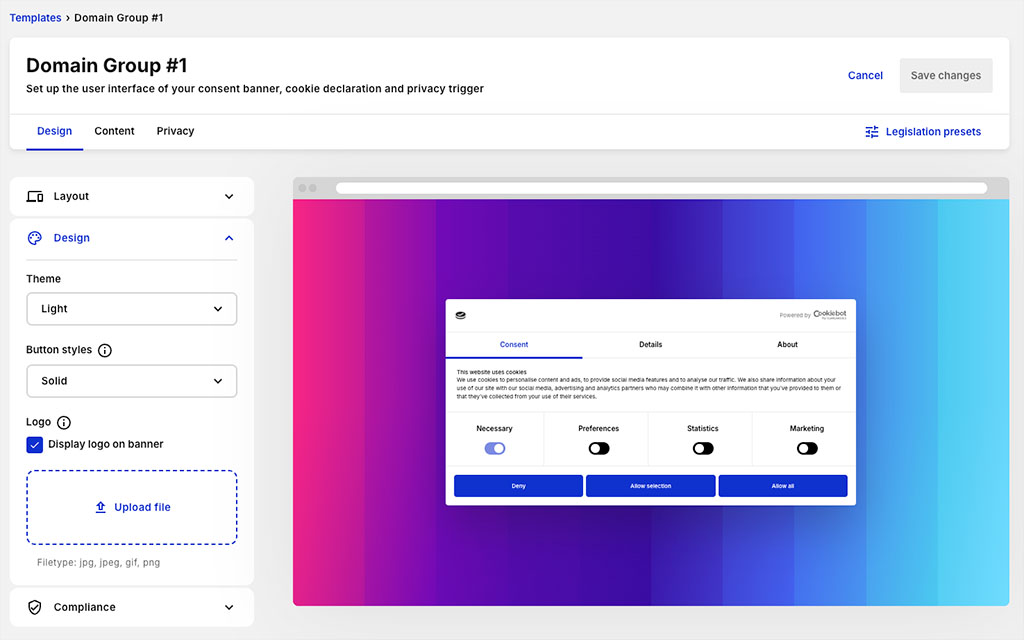
This is important because a cookie banner that’s professional in appearance can contribute to higher consent rates.
7. A genuinely useful free plan
Cookiebot CMP offers a free plan — and it’s a surprisingly useful one. It lets you:
- manage consent on one domain
- capture consent on websites / stores containing up to 50 pages
- comply with a single legal jurisdiction.
This makes it a good (and free!) starting point for small or brand-new ecommerce sites that are selling items in one country.
Disadvantages of Cookiebot CMP
1. It can negatively impact page speed
Cookiebot is a client-side script — i.e., one that loads from external servers. That means…
- It adds its own load time.
- It delays third-party scripts until consent is given.
- It can affect Core Web Vitals metrics such as Largest Contentful Paint (LCP) and Interaction to Next Paint (INP).
On sites with many third-party ads or dynamic components, these delays can become noticeable. (It’s relatively unusual for ecommerce stores to be running third-party banner ads, however).
Now to be fair, this behaviour isn’t unique to Cookiebot — it’s common among client-side CMPs — but it is important to be aware of. With a bit of configuration work (and an ‘asynchronous loading’ approach) such problems can usually be overcome, but all this may require you to have technical skills or developer support.
2. Monthly scans may not be frequent enough
Cookiebot’s default monthly scan works well for mostly static ecommerce websites. But if you frequently add new plugins, run experiments, or embed external tools, you may end up with cookies on your store that are ignored by Cookiebot until the next scan.
To address this problem, you can get Cookiebot to run manual scans. Alternatively, you can pay a monthly add-on to access daily automated scanning. This involves a significant additional fee however, which many smaller businesses may find hard to justify.
3. Costs rise quickly for large or multi-domain sites
Cookiebot’s pricing depends on:
- how many pages your site has
- how many domains (or subdomains) you manage.
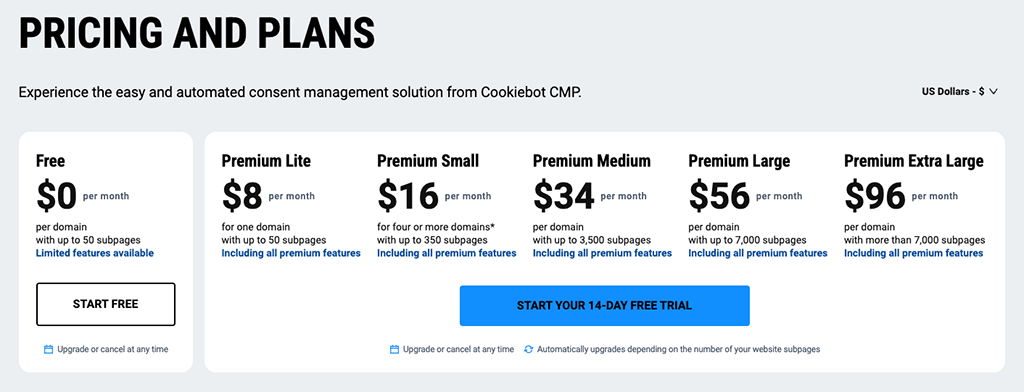
Small and mid-sized sites usually find these costs reasonable. But if you run a particularly large ecommerce site, or one that involves many localized storefronts on multiple domains, you can expect the monthly fees involved to be significant (see my screenshot below for details).
Plan
Pricing per domain/mo (USD)*
Premium Light
$8
Premium Small
$16
Premium Medium
$34
Premium Large
$56
Premium Extra Large
$96
4. Reporting tools are relatively basic
Cookiebot provides clear compliance summaries and a simple graph showing opt-ins and opt-outs over time. However, it lacks more advanced analytics such as:
- country-level insights within the dashboard
- trends by cookie category
- integration-level reporting.
You can download raw consent logs and analyze them manually, but the built-in reporting tools are focused on compliance rather than marketing or optimization.
5. Support is limited to email
Usercentrics provides a detailed knowledge base for Cookiebot, but if you need direct support from the company, you can only request it via email. There’s no live chat, no phone number, and no dedicated account manager available on standard tiers. Competing CMPs often offer broader support options.
User ratings and reviews
So far you’ve heard my take on Cookiebot CMP. But to get a broader sense of user reaction, I collated some data from popular software review sites. Based on review data on Capterra, G2, and TrustPilot, Cookiebot scores an average user rating of 4.3 out of 5 — which is perfectly respectable, and in line with how I’d personally score the product.
Review site
User rating (out of 5)
Capterra
4.3
G2
4.0
TrustPilot
4.6
Average
4.3
Cookiebot review verdict
Cookiebot CMP is one of the most reliable and mature consent management solutions available. It’s easy to install, thoroughly automates cookie detection and blocking, integrates extremely well with Google’s tools and advertising services, and offers sophisticated options for handling consent in different jurisdictions. Its free plan is also genuinely useful.
However, Cookiebot does come with some drawbacks. Its client-side nature can slow down performance on script-heavy pages; monthly scans may not be frequent enough for fast-changing websites; and its reporting and support features lag behind those of some competitors.
If you run a small or mid-sized ecommerce site and want a dependable, low-maintenance way to meet modern privacy requirements, Cookiebot is an excellent option. Larger online store owners or performance-sensitive businesses may want to consider server-side alternatives or CMPs with more advanced reporting, though.
You can learn more about Cookiebot CMP here.

Chris Singleton is the Founder and Director of Ecommercetrix.
Since graduating from Trinity College Dublin in 1999, Chris has advised many businesses on how to grow their operations via a strong online presence, and now he shares his experience and expertise through his articles on the Ecommercetrix website.
Chris started his career as a data analyst for Irish marketing company Precision Marketing Information; since then he has worked on digital projects for a wide range of well-known organizations including Cancer Research UK, Hackney Council, Data Ireland, and Prescription PR. He then went on to found the popular business apps review site Style Factory, followed by Ecommercetrix.
He is also the author of a book on SEO for beginners, Super Simple SEO.